
HomeLink®
Gentex CorporationAuto & Vehicles
3.233.00 Reviews
- Version
- 4.2.0
- Installs
- 50.00K
- Age Rating
- Everyone
Screenshots
Our Review of HomeLink®
 Analysis by Appyee
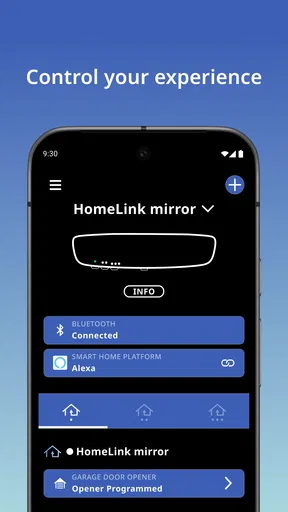
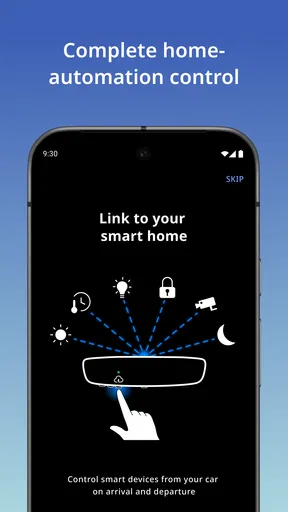
I tested HomeLink® as an in-vehicle home automation app, and its appeal became clear in a very ordinary situation: leaving home with my hands full, getting into the car, and wanting a familiar household action to happen without reaching for a phone or opening another app. It is not trying to replace a complete smart-home platform. Instead, it sits closer to the car, giving compatible vehicle controls a practical connection with selected home devices.
That narrow purpose is both its strength and its limitation. If you already use a compatible vehicle and household equipment that works with the HomeLink ecosystem, the app can make departures and arrivals feel more coordinated. If you are looking for a universal controller for every brand of light, lock, camera, thermostat, and sensor in the house, I would look elsewhere. HomeLink® is best understood as a bridge between driving routines and a home setup, not as an all-purpose command center.
How HomeLink® fits into a shared household routine
I approach a shared-car setup by agreeing on a small set of vehicle controls before anyone relies on them. That gives each driver a predictable routine and helps avoid changing household settings just to solve a one-off problem. It also makes it easier to spot when the arrangement needs adjusting, which is a useful next consideration.
A useful role when the car is part of the household system
The most convincing use case is a shared home where the vehicle is already central to daily movement. Imagine two people leaving for work while one person is carrying a bag and the other is helping a child into the back seat. A car-based control can be more convenient than stopping to search for a phone, unlocking it, finding a smart-home application, and choosing the right device. The value is not dramatic automation; it is removing a small interruption at exactly the moment when attention is already divided.
I also found the idea useful for arrival routines. A garage-related action, for example, makes more sense when it is tied to the vehicle than when it is buried among unrelated room controls. That context can make a simple command easier to remember. The app’s store summary calls it “In-vehicle home automation,” and that description is more accurate than treating it like a broad household dashboard.
Shared use requires a little discipline. A car may be used by several people, while the home itself may contain several residents with different expectations. Before relying on the system, I would agree on which actions are appropriate for everyone in the vehicle and which should remain under one person’s control. The app can support a routine, but it cannot settle household disagreements about access or responsibility.
Where it is more convenient than reaching for a phone
Compared with a normal smart-home application, the main advantage is context. A traditional app usually asks me to think in terms of rooms, device names, scenes, and account sessions. HomeLink® is more closely associated with the act of driving. That can reduce the number of steps for a small group of vehicle-related tasks, especially when the phone is in a pocket, charging, or being used for navigation.
This does not mean the car should become the only way to manage the home. A phone-based platform remains more flexible for checking status, building broader routines, or managing devices from inside the house. I see HomeLink as a convenient front door for selected actions, while the usual smart-home application remains the place for detailed administration.
One practical tip is to begin with the action that has the clearest connection to driving. Do not try to reorganize the entire home around the app on the first day. A focused setup makes it easier to notice whether the vehicle control is genuinely faster or merely another interface to maintain.
What the app does not solve for a busy family
HomeLink® does not remove the need for household coordination. If one person assumes a device is active because another person used the car, misunderstandings can follow. A command made from a vehicle may be convenient, but convenience is not the same as a shared status board. For a household with complicated schedules, I would still use ordinary messages or the main smart-home system to communicate important changes.
There is also a difference between controlling a device and knowing that the desired result happened. In a busy driveway, I would not treat a single action as proof that every part of the arrival routine is complete. I would keep visual awareness and normal safety habits, particularly around garage doors or anything that affects access to the property.
The best household use is a small, clearly understood routine rather than an invisible replacement for communication. That distinction prevents the app from being blamed for a problem that really comes from unclear expectations between people.
Starting setup without creating account confusion
Because this is a vehicle-centered app, setup should begin with the car and the household equipment that you actually expect to use together. I would avoid installing it on every family member’s phone before the primary connection is working. First establish one dependable arrangement, then decide who genuinely needs access. That sequence makes troubleshooting much easier because fewer variables change at once.
The developer is Gentex Corporation, and the app is listed as free in the Auto & Vehicles category. It is intended for Everyone, which makes it easy to consider in a household with different age groups, but an age-appropriate store rating should not be confused with unrestricted authority over a home. The person using the app may still need permission from the household owner or administrator before connecting anything.
One boundary I would set immediately is ownership. Decide whose account or device represents the household connection, who is allowed to alter it, and who is only expected to use an existing control. Without that conversation, a shared vehicle can become a source of accidental changes. The app may be simple for daily use, but the surrounding setup still deserves one clearly responsible person.
Why the minimum operating-system requirement matters
HomeLink® requires iOS or Android at version 10 or newer. That is not a difficult requirement for many current phones, but it matters in households that keep an older spare device in the car. A phone that is used only occasionally can be easy to forget when evaluating compatibility. I would check the device that will actually accompany the driver, not just the newest phone in the home.
The current release is version 4.2.0. When several people share the same vehicle, keeping the app current on the device used for setup can reduce avoidable differences between screens or connection behavior. I would still avoid updating every household device at once if the arrangement is already working; change one part at a time so it is obvious what caused a problem.
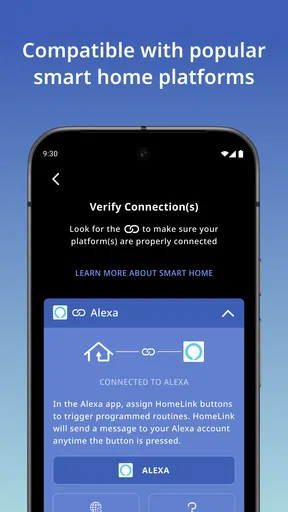
This is also where HomeLink differs from a purely web-based household service. The experience depends on the relationship between the app, the phone, the vehicle, and the compatible home equipment. If any one of those pieces is old, misplaced, or configured under another person’s control, the setup can feel less straightforward than opening a general smart-home app.
Keeping boundaries clear between driver and household owner
A useful arrangement is to separate daily operation from configuration. The person who understands the home equipment can handle the initial setup, while other approved drivers use the established controls. This is especially sensible in a shared car, where a temporary driver may need convenience but should not automatically become responsible for changing the household connection.
I would also explain the routine in plain language to anyone who uses the vehicle. Tell them what the control is meant to do, when it should be used, and what to check afterward. That short explanation is more valuable than assuming that a familiar-looking button has an obvious meaning. It also helps prevent a guest or younger driver from experimenting with a control they do not understand.
For a household that wants separate personal profiles, detailed permissions, or a robust record of who changed what, I would choose a dedicated smart-home platform instead. HomeLink® can be useful at the vehicle edge of the system, but it should not be mistaken for a full identity and access-management tool.
Coordinating arrival and departure without over-automating
The most reliable routines are the ones that match a physical moment. Leaving the driveway, returning home, or preparing a vehicle for a familiar destination gives the action a natural place in the day. That is more dependable than assigning controls to vague times such as “morning” or “evening,” when family schedules can change.
For a shared household, I would create a simple verbal convention. One person can say that the home-side action has been handled, while another knows not to repeat it. This may sound basic, but it prevents the common problem of two people acting independently because neither knows what the other has done.
A second useful habit is to keep the car-based routine limited to actions that are easy to verify. If the result is visible from the driver’s seat or naturally checked during arrival, the arrangement is easier to trust. For less obvious actions, I would use the primary smart-home app or another direct confirmation method rather than depending entirely on a quick vehicle interaction.
A realistic everyday example
Consider a household where one adult drives home with groceries while another person is already inside. The driver wants the arrival process to be simple, but the person inside does not want unexpected changes to the home. A sensible arrangement would be to agree beforehand that the vehicle control is used only for the routine connected to arrival. The driver uses the established control, the person inside knows what that means, and neither person needs to search through separate menus while carrying bags.
The important detail is the agreement, not the novelty of controlling the home from the car. If the same control could mean different things on different days, the convenience quickly disappears. I would keep the routine stable and explain any change before relying on it. This is where HomeLink® feels most useful: as a predictable extension of an existing habit.
Age, trust, and safe everyday use
The Everyone rating makes the app approachable for a broad household, but I would still think carefully before handing a young driver unrestricted use of vehicle-connected home controls. Age is only one factor. Understanding, maturity, and the consequences of an action matter just as much. A teenager may be perfectly capable of using an agreed routine while not being ready to change the underlying configuration.
For younger users, I would demonstrate the intended action in the parked vehicle and explain when it is appropriate. I would not encourage experimenting while driving, and I would keep any setup work with an adult who understands both the car and the home equipment. The app should support attention to the road, not compete with it.
Trust also matters between adults. A shared car can blur the line between personal convenience and household authority. Someone may be allowed to use a control without being allowed to connect a new device or alter an existing arrangement. Making that distinction explicit avoids treating access as an all-or-nothing decision.
Privacy and practical trust inside a shared car
Any vehicle-linked home control deserves a little thought about who can use the vehicle. Family members, visitors, mechanics, coworkers, or temporary drivers may all sit in the same car at different times. I would consider whether a person should be able to see or trigger the connected routine simply because they are present in the vehicle.
This is not an argument against using HomeLink®. It is a reminder to keep the physical car in mind when deciding who belongs in the household workflow. If the vehicle is frequently lent to others, a simpler and more limited arrangement may be wiser than connecting sensitive home actions to the shared cabin experience.
I would also avoid describing the app to children as a game or letting them press controls for entertainment. The app belongs to the Auto & Vehicles space, and its actions can have real-world consequences. Clear rules are more useful than assuming that a friendly interface automatically teaches responsible use.
How the public response affects my recommendation
HomeLink® has an average rating of 3.2 from around 75 ratings, with around 33 written reviews. I read that overall response as mixed rather than alarming. It suggests that the concept works well for some people but that compatibility, setup, or expectations can make the experience uneven. I would not choose it solely because the idea sounds convenient; I would first confirm that my vehicle and intended home equipment belong in the same workflow.
The app has passed 50 thousand installs, which gives it a meaningful user base without making it feel like a universal household standard. That matters when comparing it with larger smart-home platforms. A broad platform is more likely to be the better choice if you want one place for many brands and detailed household management. HomeLink® makes more sense when the vehicle connection is the reason you are looking for an app in the first place.
Where it beats the usual alternatives
Against a conventional phone-based smart-home app, HomeLink® wins on physical context. The driver is already in the vehicle, and the desired action may be related to leaving or arriving. That can make the routine feel more direct than opening a general-purpose application and navigating through a long list of devices.
Against a voice assistant, the advantage is different. Some people do not want to speak commands in a busy car, around passengers, or while concentrating on traffic. A familiar vehicle control can be quieter and less dependent on recognizing spoken words. I would still favor voice or phone control inside the home, where there is more time to confirm what is happening.
Against a dedicated smart-home hub, HomeLink® is less ambitious. A hub is usually the better choice for scenes, schedules, device groups, notifications, and a larger mixture of brands. The trade-off is that a hub can feel excessive if your main need is a small bridge between driving and home access. HomeLink earns its place through that focused relationship rather than through breadth.
Who should use it and who should skip it
I would recommend HomeLink® to someone who owns a compatible vehicle, has a clear vehicle-to-home routine, and values quick access more than a large collection of automation features. It is particularly appealing when several approved drivers share a car and everyone can agree on what the controls mean.
I would skip it if the household does not use the car as part of its home routine, if the main goal is managing a wide range of devices, or if different residents need strict personal permissions. I would also hesitate when the vehicle is regularly loaned to people outside the household. In those cases, a general smart-home platform with clearer administration may be a safer and more flexible foundation.
My household verdict
After using HomeLink® as a focused vehicle companion, I see a useful idea that works best when kept deliberately small. It can turn a familiar driving moment into a practical household action, and that is valuable when hands, time, and attention are limited. The experience is most convincing when the car, the home equipment, and the family agreement all point in the same direction.
My recommendation comes with a boundary: treat it as an in-vehicle control layer, not the household’s entire automation strategy. Set it up through one responsible person, explain the routine to every approved driver, and keep important coordination visible rather than assuming the app communicates on everyone’s behalf. Those habits make the technology easier to trust.
HomeLink® is free, rated for Everyone, and developed by Gentex Corporation, but those broad details do not decide whether it belongs in your home. The real question is whether your daily driving pattern gives the app a clear job. If the answer is yes, its focused approach can be genuinely convenient. If the answer is no, a standard smart-home app will probably offer more value with less connection between the car and the household.
Verdict
Strengths of HomeLink®
- Lets you control compatible smart-home devices from one central app.
- Remote access helps monitor and manage your home while away.
- Supports personalized routines and automation for daily tasks.
- Can improve convenience by connecting multiple home functions.
- Useful alerts can help you stay informed about activity at home.
Limitations of HomeLink®
- Works only with compatible HomeLink® devices and supported systems.
- Initial setup may take time, especially with several connected devices.
- Some features depend on a stable internet connection.
- Remote controls may be limited during service or network outages.
- Privacy and account security settings require careful attention.
Similar Picks in This Category
View All
Android Auto
Google LLC4.1

maxim — order a taxi & food
PT. SITO4.7

Штрафы ГИБДД: проверка с фото
Pays LLC – Штрафы ГИБДД4.7

Номерограм – проверка авто
Авто Ассист4.8

Дром Авто
Дром4.9

Frequently Asked Questions
What is HomeLink® and what can I use it for?
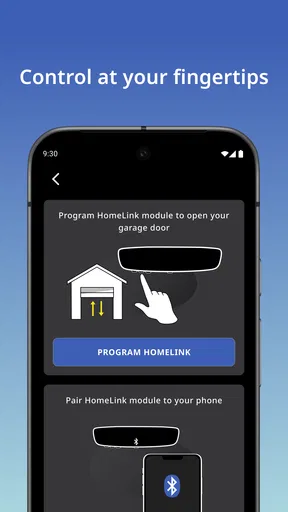
HomeLink® is a smart-home connectivity system designed to let compatible vehicles communicate with connected garage doors, gates, lights, and other household devices. After setup, you can use the buttons integrated into a supported vehicle or the appropriate mobile interface to activate linked devices without carrying separate remotes. Its usefulness depends on your vehicle, regional availability, and compatible HomeLink® products.
Is HomeLink® compatible with my car and garage door opener?
Compatibility is not universal, so you should check both your vehicle model and the garage-door or gate opener before downloading or setting up HomeLink®. Many newer vehicles include built-in HomeLink® controls, while others may require an accessory or a compatible app connection. Some openers also need an additional bridge or compatibility kit, particularly when they use rolling-code security systems.
How do I program HomeLink® with a garage door opener?
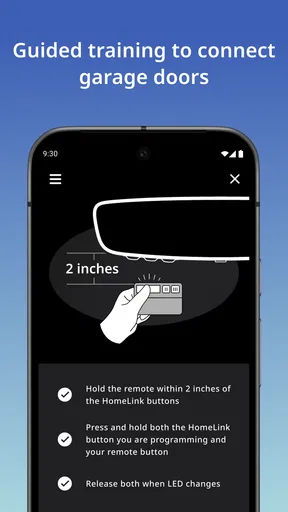
Programming usually involves placing the original remote close to the vehicle’s HomeLink® controls, selecting the desired button, and holding both controls until the indicator changes. Rolling-code openers commonly require pressing a learn or program button on the opener and then completing a second synchronization step from inside the vehicle. The exact sequence varies, so the vehicle and opener manuals should be followed carefully.
Does HomeLink® work without an internet connection or smartphone?
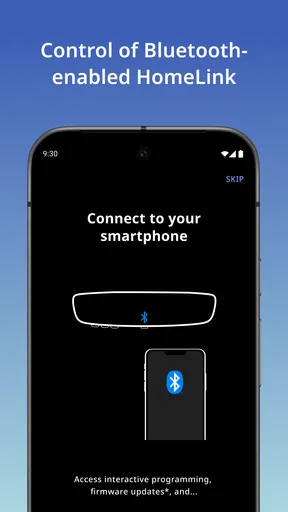
For a basic built-in HomeLink® setup, opening a programmed garage door or gate generally does not require a smartphone or active internet connection because the vehicle communicates directly with the receiver. However, internet access may be necessary for remote-control features, account setup, smart-home bridges, firmware updates, or device management through a companion application. Available functions depend on the installed system.
Is HomeLink® safe and what should I know before using it?
HomeLink® is designed to provide secure, convenient control of compatible devices, but it should be used responsibly. Avoid activating a garage door when you cannot see the area, and keep vehicle controls protected from unauthorized use. If you sell the car, lend it to someone, or replace an opener, erase stored programming and review the manufacturer’s security instructions to prevent unwanted access.
